Skip to content
Backmiles

New: rebuild past drives from Google Timeline

Catch up on every business mile you missed — then never miss another.

Backmiles rebuilds past drives from your Google Maps Timeline, logs new ones on its own, and learns your places so sorting takes seconds.

How much did you miss? Find out in 30 seconds
  • Free for 100 miles a month
  • iPhone and Android
  • No card to start
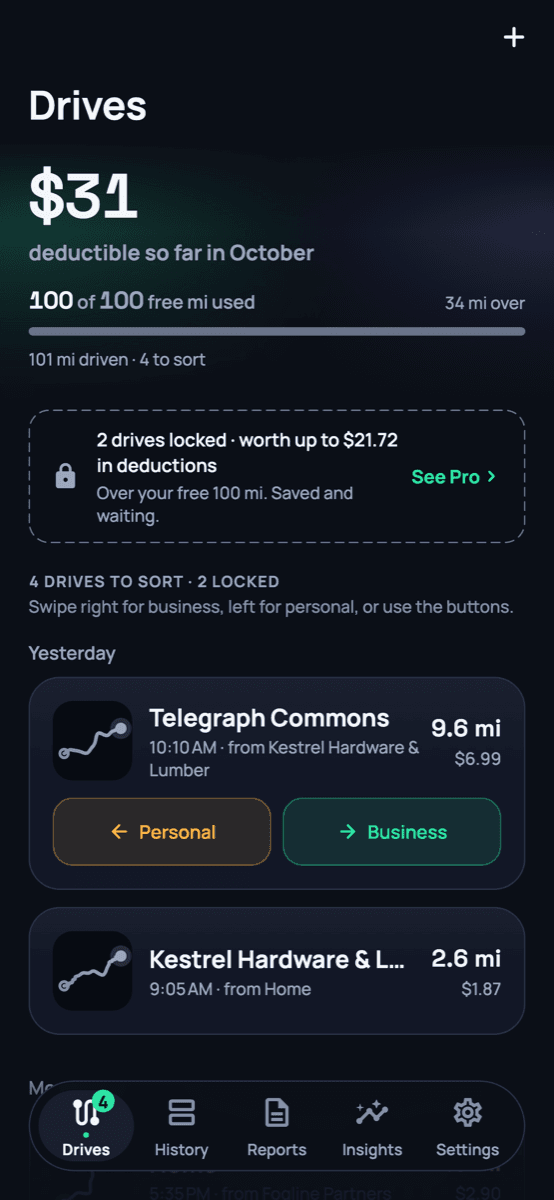
Backmiles drives feed showing $31 deductible so far in October, with drives to sort (demo data)

76¢

per mile, the current IRS rate, built in

0 bytes

of your Timeline file uploaded. It's read on your phone

$0

to start. No card, no trial clock

Placeholder · reviews
Real reviews from drivers will go here after launch, with their permission. No made-up quotes.

How it works

Three steps. Most days, just one.

  1. 01

    Drive like you always do

    Backmiles notices when you start driving and logs the route, the miles and what they're worth. No start button.

  2. 02

    Swipe to sort

    Right for business, left for personal. Sort a place once and Smart remembers it, so most drives sort themselves.

  3. 03

    Send the log

    A clean PDF and CSV for any month or the whole year, valued at the IRS rate for each date.

Why Backmiles

A mileage log that looks backward, too.

Most mileage apps start counting the day you install them. Backmiles also finds the drives from before, then makes the next ones effortless.

Catch up

Get back the drives you never logged.

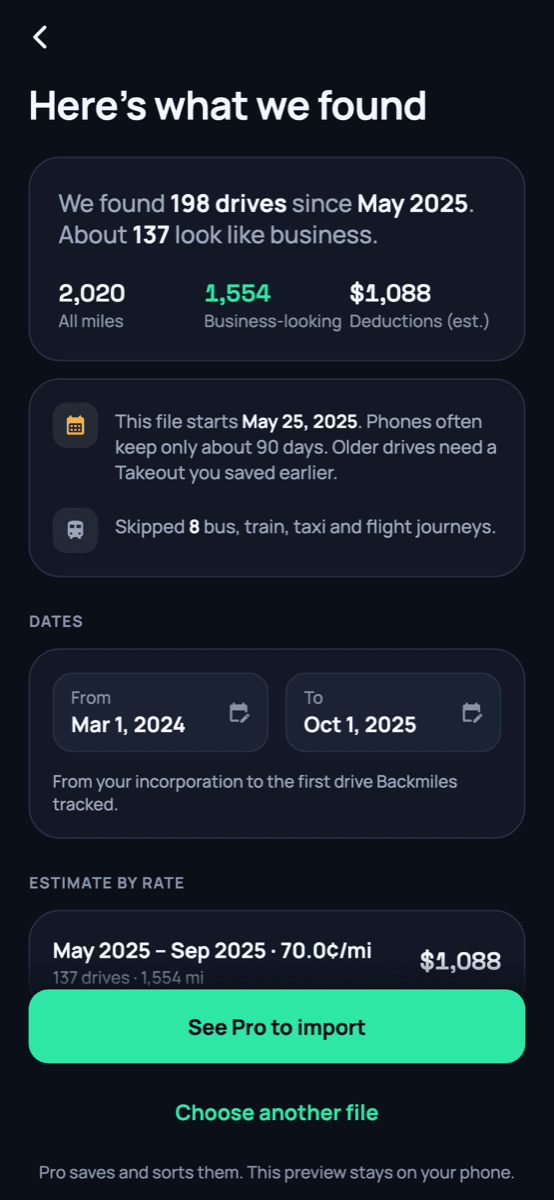
If Google Maps Timeline was on, your phone already knows where you drove. Export it once, and Backmiles rebuilds those drives so you can sort them and claim them.

  • Your Timeline file is read on your phone and never uploaded
  • Buses, trains, taxis and flights are skipped
  • See what you missed for free, before you pay a cent
Estimate what you missed
Backfill preview: we found 198 drives since May 2025, about 137 look like business, worth about $1,088 (demo data)

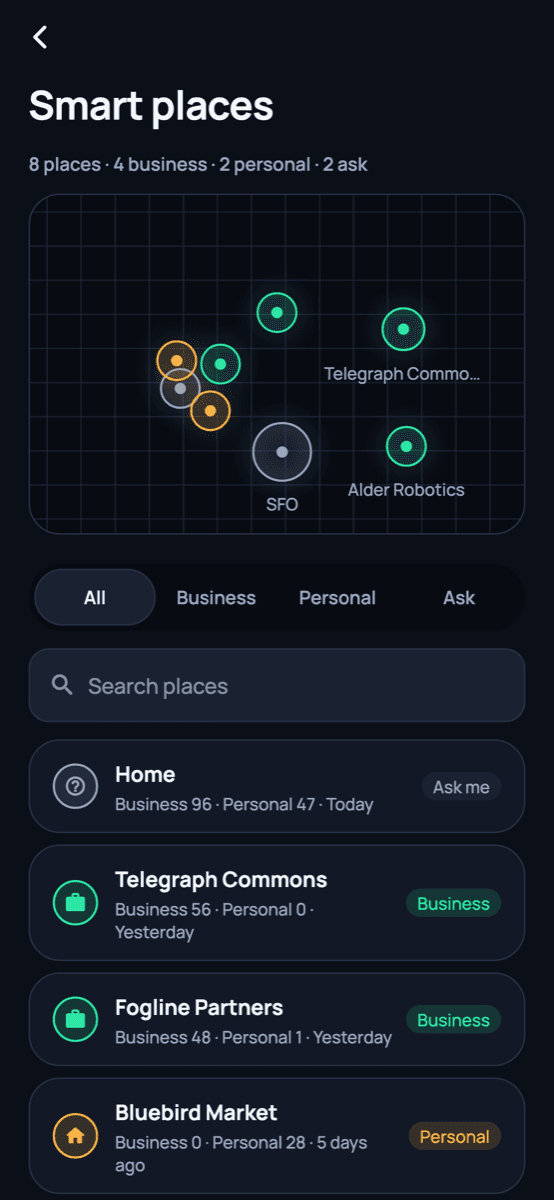
Smart places

Sort a place once. Backmiles remembers.

Every place you drive to learns from your swipes. The client's office is business; the grocery store is personal. The next drive there sorts itself, and tells you why.

  • Every automatic decision shows its reason, like “Acme HQ · business 12×”
  • Change one, and choose whether the rule changes too
  • Work hours for shift days, so weekends stay personal
Smart places map and list: Home set to ask me, Telegraph Commons business, Bluebird Market personal (demo data)

Teams

The whole team on one plan.

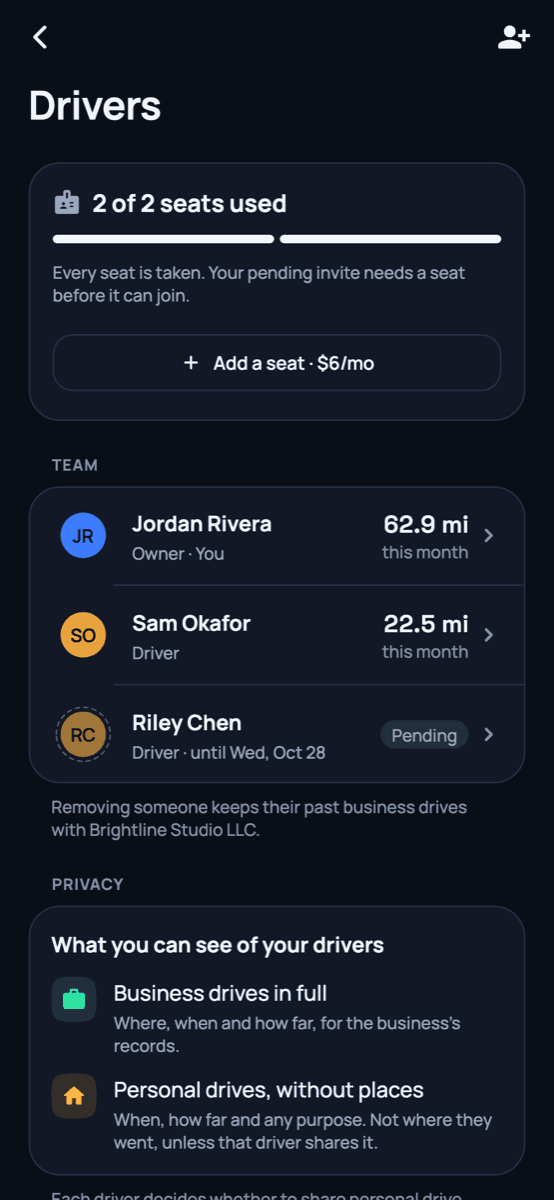
Invite a partner, a spouse or your crew for $6 a month each. Everyone gets unlimited miles and the places the business has already learned.

  • Owners see business drives in full
  • Personal drives show as totals only, never where someone went
  • Reports per driver or for the whole business
Backmiles for teams
Drivers screen: 2 of 2 seats used, team list, and what owners can see of their drivers (demo data)

App screens show demo data.

30-second check

How much did you miss?

Three quick questions. We'll estimate the deductions you haven't logged, using the IRS rate for each year.

When did you start driving for work?

Roughly is fine: when you started the business, or the gig.

Or pick the month

Privacy

Where you go is your business.

A mileage log knows a lot about your days. We built Backmiles so it knows only what it needs, and shows only what it should.

Read the privacy policy
  • Your Timeline stays on your phone

    The export is read on your device. We keep the drives you choose to save, never the raw file.

  • Location never feeds analytics or ads

    Our analytics see taps and screens, with text and maps masked. Coordinates and addresses never go there.

  • Employers see work, not your life

    Team owners see business drives. Personal drives are totals only, unless you decide to share.

  • Yours to take or delete

    Export everything or delete your account from the app, any time. We don't sell or rent your data.

Pricing

Free to start. Pro when it pays for itself.

Pro is $96 a year. At today's IRS rate of 76¢ a mile, that's covered by about 127 business miles.

Free

For trying it, or for light months

$0

Free forever

  • 100 miles a month, logged automatically
  • Swipe to sort, PDF and CSV reports
  • Past-drive preview: see what your Timeline holds
  • Drives past 100 mi are kept, not lost

Recommended

Pro

For anyone who drives for work

$96/year

$8.00/mo, billed yearly · 2 months free

  • Unlimited miles
  • Smart places and work hours sort drives for you
  • Import past drives from Google Timeline, no extra charge
  • Every report, any date range

Extra drivers

Add people to your Pro plan

+$57.60/year each

$4.80/mo per driver, billed yearly

  • Unlimited miles for each driver
  • Shares the places your business has learned
  • Personal drives stay private to the driver
  • Reports per driver or combined

Prices in US dollars. Pro is bought in the app and billed by Apple or Google, so your store may show local currency and tax. Cancel any time in your phone's subscription settings.

Compare

How Backmiles stacks up.

The short version, from each app's own pricing and help pages. We link every source so you can check.

Backmiles compared with other mileage apps
FeatureBackmilesMileIQEverlanceDriversnote
Free tierYes — 100 miles/monthYes — 40 drives/month1Yes — 30 auto-detected trips/month5Yes — up to 15 trips/month7
Price per year$96/yr$139.99/yr2$69.99–$89.99/yr (Starter)5$150/yr8
Team pricing+$6/driver/mo or $57.60/yr$8/user/mo (Teams Lite); $9 Teams; $10 Teams Pro3$12/user/mo or $120/user/yr (Premium)6$11/license/mo (Teams)7
Backfill from Google TimelineYes — Google Maps Timeline (and GPX)Not listed1Not listed5Not listed7
Remembers places / auto-sortingSmart places learn from your swipes, plus work hoursNamed Locations, Work Hours, Frequent Drives4Work Hours, Favorite Places, Favorite Trips5Saved locations, work schedule, multiple workplaces8

Sources

  1. 1. https://mileiq.com/pricing
  2. 2. https://apps.apple.com/us/app/mileiq-mileage-tracker-log/id578830929
  3. 3. https://mileiq.com/pricing-for-business
  4. 4. https://support.mileiq.com/hc/en-us/articles/218138823-What-can-I-do-with-MileIQ
  5. 5. https://www.everlance.com/pricing
  6. 6. https://www.capterra.com/p/174335/Everlance/pricing/
  7. 7. https://www.driversnote.com/pricing
  8. 8. https://apps.apple.com/us/app/mileage-tracker-by-driversnote/id924418916

Prices as of October 15, 2026; check their sites for current pricing.

See the full comparison

Questions

Fair questions, straight answers.

Something else? Write to support@backmiles.com.

Is Backmiles really free?

Yes. The free plan logs every drive and includes your first 100 miles each month, with swipe sorting and reports. Drives past 100 miles are still recorded and kept; they unlock the moment you go Pro. No card needed to start.

How do you find drives I never logged?

If Google Maps Timeline was on, your phone already kept a record of where you drove. You export that file from Google Maps (we show you how, step by step), and Backmiles reads it on your phone to rebuild the drives. The file is never uploaded. Free users see what we found and what it's worth; Pro saves and sorts them.

How far back can it go?

As far back as your Timeline file goes. Since Google moved Timeline onto phones in 2024, many phones keep about 90 days unless the setting was changed or you saved an older export. If you never had Timeline on, there's nothing to import, and you can still add drives by hand.

Does it work on iPhone?

Yes, on iPhone and Android. On iPhone, past drives come from Google Maps Timeline if you used it. Apple's own Significant Locations can't be exported, so we can't import from it.

Will it drain my battery?

Backmiles uses your phone's motion sensors to notice when you start driving and only turns on GPS while you drive. Battery savers can pause it, so the app tells you if something is blocking detection and how to fix it.

Is the log good enough for the IRS?

Each drive records the date, miles, start and end, and the business purpose, which is what an IRS mileage log asks for. Reports come as PDF and CSV for you or your accountant. We're not tax advisers, so check your situation with a tax professional.

If my employer adds me, can they see where I go?

They see your business drives in full. Personal drives show as totals only (when, how far), never where you went, unless you choose to share them. You see exactly what your employer can see.

Can I bring my history from another mileage app?

Not directly yet. Keep the reports you exported from your old app for past years. For the drives your old app missed, the Google Timeline import can often fill the gaps.

How do I cancel?

Pro is billed by Apple or Google, so you cancel in your phone's subscription settings in a couple of taps. You keep Pro until the end of the period you paid for, and your drives stay yours.

Do you sell my location data?

No. We don't sell or rent your data, and location never goes to analytics or ad tools. You can export or delete everything from the app.

Start with the miles you already drove.

Install Backmiles, bring in your Timeline, and see what you missed. Free to start.

Privacy settings

Off until you turn them on. Change this any time from the footer.